01
Passwords & accounts
Keep logins and account details together. Copy what you need, when you need it.
A little less to remember.
Passwords, cards and important documents, together in one place. Right on your phone. Right where they belong.
Take a look inside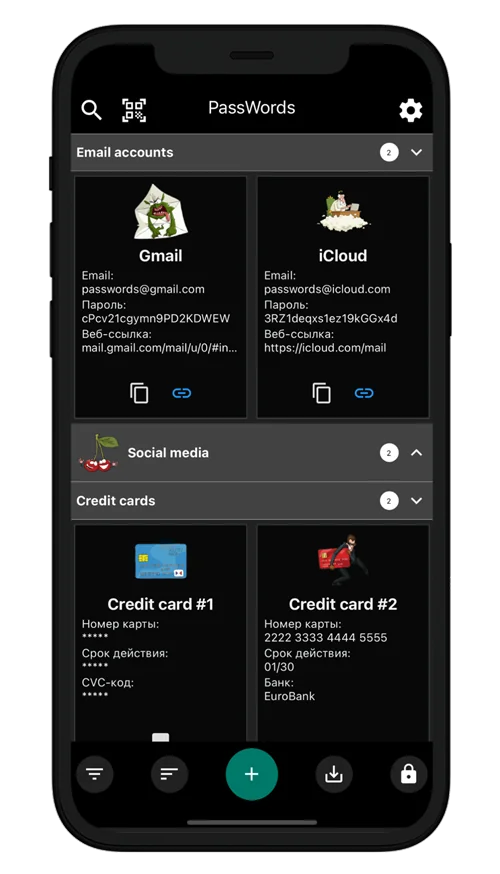
Small app. Everyday peace of mind.
The useful details of your digital life, organized your way.
Keep logins and account details together. Copy what you need, when you need it.
Save card details, attach photos and keep important files alongside your entries.
Use the built-in generator to create a new password, instead of reusing an old one.
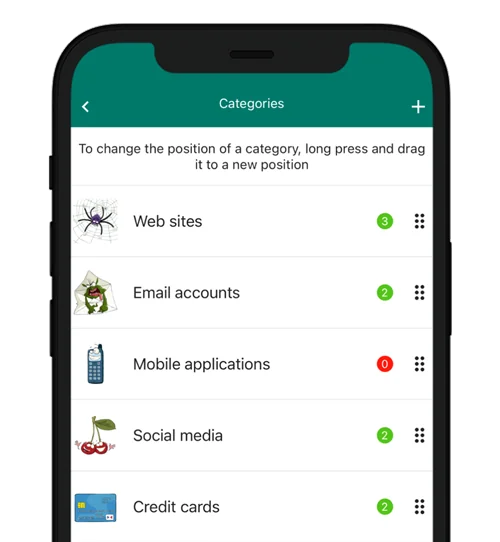
A place for everything.
Start with a ready-made category or create your own. Choose the fields, icons and colors that make sense to you.
Private, by design.
PassWords stores your vault on your device. You do not need to create an online account or send your passwords to our servers.
Access and organize your saved entries without an internet connection. Store purchases and external links use their respective services.
Use your master password, or enable biometric unlock on a supported device.
Create backup archives and choose where to keep them. Keep a separate copy before changing or losing your phone.
 PassWords
Yes. Your vault, entries and search work locally. Downloading the app, making or restoring purchases, and opening external links require the relevant store or service.
No. You set up the app on your device with a master password. This does not create an account on our servers.
Yes. Use categories and custom fields for card details, accounts and other information, and attach images or documents to your entries.
Your vault is not automatically synchronized with our servers. Create backups regularly and keep a copy somewhere separate from your phone. You need a compatible backup and its password to restore your data.
We cannot reset your master password or restore your vault remotely. Keep your password and backup archives safe. If you already enabled biometric unlock and it still works, use that access to review your recovery options in the app.
PassWords supports Android and iOS. Features and availability may differ by platform and store. The app offers an optional Pro purchase; current prices and purchase conditions are shown in the store.
One less thing on your mind.
Give your passwords and important details a place of their own.